
Great news for all candidates who registered for the 2026 UTME! JAMB has officially activated the portal for candidates to reprint 2026 JAMB exam slip ahead of the examination. If you registered for the 2026 Unified Tertiary Matriculation Examination (UTME), you must now visit the portal to print your examination slip and confirm every important detail about your test schedule.
In this post, you will learn exactly how to reprint 2026 JAMB exam slip, what information appears on the slip, and what to do if you encounter any issues during the process.
Why You Must Reprint 2026 JAMB Exam Slip
Your JAMB examination slip is the most important document you need on your exam day. It contains your scheduled exam date, assigned venue, reporting time, and your passport photograph. Without it, you cannot gain entry into the examination hall.
JAMB does not send these details through text messages or email. Instead, the Board requires every candidate to personally visit the reprinting portal and download the slip. Therefore, you should reprint 2026 JAMB exam slip as soon as possible to avoid last-minute rushes or server issues close to the exam dates.
Information Displayed on Your JAMB Exam Slip
Once you successfully reprint 2026 JAMB exam slip, the following details will appear on it:
- Full Name of the candidate
- JAMB Registration Number
- Examination Date (the specific day you will sit for the exam)
- Examination Time (your reporting time and session)
- Examination Venue (the exact CBT centre assigned to you)
- Passport Photograph used during registration
- Chosen Subjects for the examination
Make sure you review all this information carefully after you print the slip. If you notice any errors in your name or photograph, contact JAMB immediately through their official support channels before your exam day arrives.
Must Read: How to Reprint Your JAMB UTME Mock Exam Slip 2026 (Complete Step-by-Step Guide)
How to Reprint 2026 JAMB Exam Slip (Step-by-Step Guide)
Follow these simple steps to reprint 2026 JAMB exam slip without any difficulty:
Step 1: Visit the Official JAMB Slip Reprinting Portal
Open your web browser and go to the official JAMB e-slip printing page at:
👉 https://slipsprinting.jamb.gov.ng
Make sure you only use this official link. Do not click on random links from social media or unofficial websites, as they could be phishing scams.
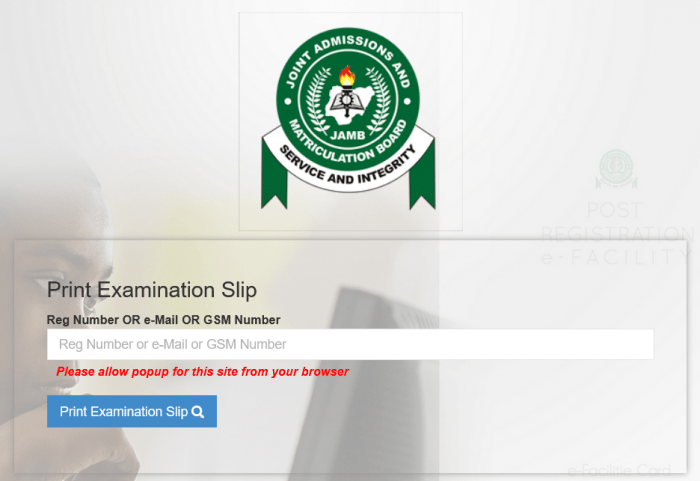
Step 2: Choose Your Login Method
The portal gives you two options to retrieve your exam slip. You can either enter your JAMB Registration Number or the phone number you used during registration. Choose whichever option is more convenient for you.
Step 3: Enter Your Details
Type your JAMB registration number (e.g., 2026XXXXXXXX) or your registered phone number in the space provided. Double-check the details before you proceed to avoid errors.
Step 4: Click “Print Exam Slip”
After entering your details, click the “Print Exam Slip” button. The system will retrieve your information and display your examination slip on the screen.
Step 5: Download and Print
Once your slip loads on the screen, download it as a PDF file or print it directly. You should print at least two copies — keep one at home as a backup and carry the other to your examination venue.
When Should You Reprint Your Slip?
JAMB typically activates the reprinting portal a few days before the examination begins. Since the portal is now live, you should reprint 2026 JAMB exam slip immediately. Waiting until the last day often leads to frustration because thousands of candidates flood the portal at the same time, causing it to slow down or crash temporarily.
Additionally, printing your slip early gives you enough time to locate your exam centre, plan your transportation, and prepare adequately without unnecessary panic.
Common Problems Candidates Face and How to Solve Them

While most candidates reprint 2026 JAMB exam slip without issues, some encounter minor problems. Here are the most common ones and their solutions:
1. “No Record Found” Error
This error usually appears when you type an incorrect registration number or phone number. Go back and enter the correct details. If you have forgotten your registration number, you can retrieve it by sending UTME to 55019 from the phone number you used during registration.
2. Portal Not Loading
If the portal refuses to load, the server may be experiencing heavy traffic. Try again during off-peak hours — early mornings or late nights tend to work best. You can also switch to a different browser or clear your browser cache before retrying.
3. Slip Shows Wrong Photograph
If the photograph on your slip does not match your face, visit any JAMB state office near you with a valid form of identification. JAMB officials will assist you in correcting the issue before your exam date.
4. Exam Date or Venue Not Yet Assigned
In rare cases, your slip may not display an exam date or venue. This could mean JAMB has not yet scheduled your batch. Check back on the portal after a day or two, as JAMB often releases schedules in batches.
Important Tips for Your JAMB Exam Day
After you successfully reprint 2026 JAMB exam slip, start preparing for the big day. Keep these essential tips in mind:
- Arrive Early: Get to your exam venue at least one hour before your scheduled time. Late candidates may not be allowed into the hall.
- Carry Your Slip: Your printed exam slip is your entry pass. No slip means no entry, so do not forget it at home.
- Bring a Valid ID: Carry a valid means of identification alongside your exam slip. This could be your national ID card, voter’s card, or international passport.
- Avoid Prohibited Items: Do not bring phones, calculators, wristwatches, or any electronic device into the examination hall. JAMB strictly enforces this rule and will disqualify anyone caught with such items.
- Stay Calm: Read each question carefully, manage your time well, and remain confident throughout the exam.
Frequently Asked Questions
Can I reprint my JAMB exam slip from my phone?
Yes, you can. Simply open your phone browser, visit the JAMB reprinting portal, and follow the same steps. You can then save the slip as a PDF and print it at a nearby business centre.
Is there a fee to reprint the exam slip?
No. JAMB does not charge any fee for exam slip reprinting. The process is completely free on the official portal.
Can someone else reprint my slip for me?
Yes. Anyone who has your JAMB registration number or registered phone number can reprint the slip on your behalf. However, make sure you only share your details with someone you trust.
Final Thoughts
The JAMB reprinting portal is now live, and every registered candidate should take immediate action. Do not wait until the last minute to reprint 2026 JAMB exam slip, because delays could cost you valuable preparation time and peace of mind.
Visit slipsprinting.jamb.gov.ng right now, enter your registration number or phone number, and download your slip. Once you have confirmed your exam date, venue, and time, focus all your energy on studying and revising for the test.
We wish every candidate the very best in the 2026 UTME. Share this post with your friends and classmates so they can also reprint their exam slip on time!
Stay updated on the latest JAMB news by bookmarking this page and checking back regularly.
Related:
JAMB Direct Entry (2026 Registration/Guide)
Over 2.24 Million Candidates Register for 2026 JAMB UTME: Proven Strategies to Score High