
The National Examinations Council (NECO) officially opened the portal for external candidates wishing to sit for the Senior School Certificate Examination (SSCE External), signaling that the 2026 NECO GCE registration window is fully active. Whether you are seeking to make up for academic deficiencies in previous sittings or you are a private candidate looking to gain admission into higher institutions, securing your application early ensures a stress-free examination experience.
This comprehensive guide walks you through the timelines, fee structures, technological changes, and step-by-step application instructions you need to navigate your application successfully.
Everything You Must Know As 2026 NECO GCE Registration Begins
The examination body has introduced several strict operational updates this year to improve exam security and streamline the application workflow. You must understand these structural updates before you spend money or visit a cybercafe to begin your NECO GCE registration.
Important Dates for Your 2026 NECO GCE Registration
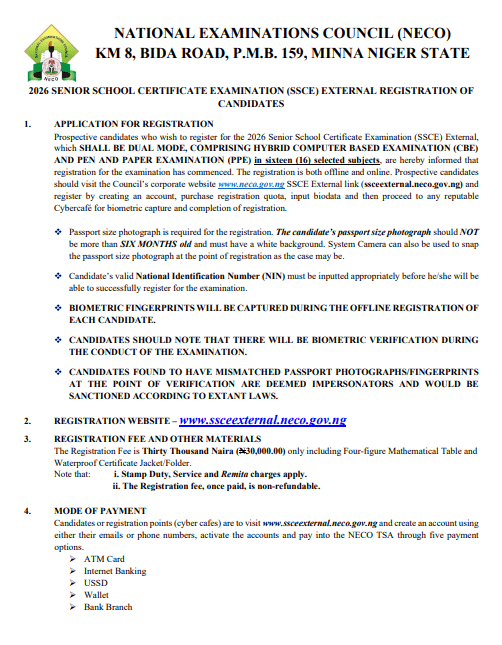
Timing is critical when preparing for external examinations, and missing deadlines can result in heavy penalty fees or complete exclusion from the exam. Mark these official schedules on your calendar:
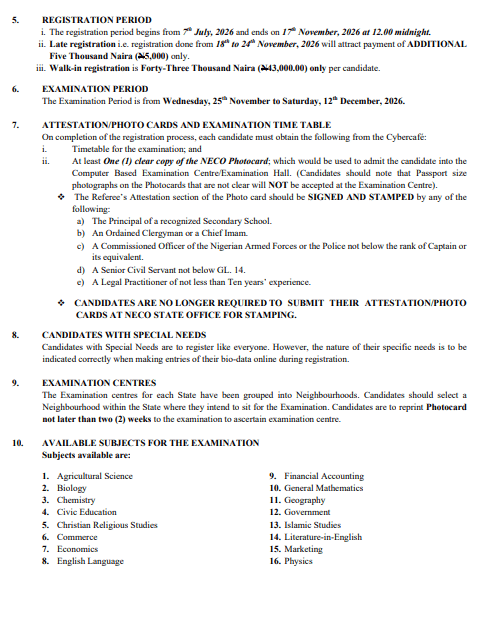
- Regular Registration Window: The Council started accepting applications on Monday, July 7, 2026, and the regular portal remains open until Tuesday, November 17, 2026, at 12:00 midnight.
- Late Registration Window: If you miss the standard deadline, you can still apply between Wednesday, November 18, 2026, and Tuesday, November 24, 2026.
- Examination Schedule: The actual examinations commence across designated centers nationwide on Wednesday, November 25, 2026, and conclude on Saturday, December 12, 2026.
Official Breakdown of NECO GCE Registration Fees and Charges
Budgeting accurately prevents surprises when you arrive at payment points or cybercafes. The Council maintains a transparent pricing structure across three distinct registration tiers:
| Registration Tier | Application Timeline | Fee Per Candidate | What the Fee Includes |
| Regular Entry | July 7 – Nov 17, 2026 | ₦30,000 | Exam access, Four-Figure Mathematical Table, and Waterproof Certificate Folder. |
| Late Entry | Nov 18 – Nov 24, 2026 | ₦35,000 | Standard base fee plus a mandatory ₦5,000 late penalty surcharge. |
| Walk-In Entry | During Exam Period | ₦43,000 | Special accommodation for candidates registering at least 3 hours before a subject paper. |
Note that standard bank transaction charges, Remita processing fees, and cybercafe operator service charges apply separately from these official Council rates.
Step-by-Step Instructions to Complete Your NECO GCE Registration
You must complete your application systematically to prevent data errors or biometric failures. Follow this logical roadmap to complete your NECO GCE registration without administrative complications.
Why You Need Your NIN Before You Start NECO GCE Registration
You cannot access the application portal without a valid National Identification Number (NIN). The National Examinations Council integrates its database directly with the National Identity Management Commission (NIMC) to verify candidate identities and eliminate impersonation.
- Verify Your Identity Early: Ensure you obtain your NIN from an accredited NIMC center before initiating your NECO GCE registration.
- Match Your Records Exactly: Your name, date of birth, and gender on your identity slip must match the exact biodata you intend to use for your examination.
- Resolve Discrepancies Immediately: If your NIN slip contains spelling errors or an incorrect birth year, visit an NIMC office to correct the records before you purchase your examination quota.
How to Navigate the NECO GCE Registration Portal Online
The online portal serves as your primary gateway for creating an account and paying official fees. Complete your digital setup by following these actions:
- Visit the Official Web Portal: Navigate exclusively to https://ssceexternal.neco.gov.ng/ or follow the SSCE External link on the main Council website.
- Create a Personal Account: Register a new user profile using your active email address or phone number. Then verify the account via the confirmation link sent to your inbox. Click on the SIGN UP tab to get started.
- Purchase Your Registration Quota: Log into your dashboard and generate a Remita Retrieval Reference (RRR). Then pay your examination fee using any approved Treasury Single Account (TSA) payment channel.
- Input Your Core Biodata: Enter your NIN, state of origin, contact address, and personal information into the online form.
Biometric Fingerprint Capture Requirements for NECO GCE Registration
After creating your online account and paying your quota, you must transition to an offline process to capture your physical verification data.
- Visit an Accredited Cybercafe: You cannot perform biometric captures on standard smartphones or unapproved home computers. You must visit a reputable cybercafe equipped with the Council’s offline registration software and biometric fingerprint scanners.
- Capture All Ten Fingerprints: Ensure the operator scans all your fingers clearly during the offline application phase.
- Upload a Standard Photograph: Provide a recent passport photograph that is not more than six months old. It should feature a clean white background and a direct view of your face without sunglasses or head coverings that obscure your features.
- Synchronize and Print Evidence: Instruct the operator to upload your captured biometric data to the central server immediately. Once synchronized, print out at least one clear copy of your official NECO Photocard and the examination timetable.
Step-by-Step Process to Complete Your NECO GCE Registration
The NECO GCE registration procedure involves both online and offline components. Prospective candidates should carefully follow the instructions on the SSCE External link on www.neco.gov.ng before embarking on the exercise.
- Online Account Creation: Candidates must visit the corporate website at www.neco.gov.ng or the registration website at www.ssceexternal.neco.gov.ng to create an account, purchase a registration quota, and input their biodata.
- Mandatory NIN Requirement: A valid National Identification Number (NIN) must be inputted appropriately before a candidate can successfully register for the examination. The candidate’s NIN will subsequently be inscribed on their certificate.
- Photograph Rules: A passport-size photograph with a white background that is not more than six months old is required for registration. Alternatively, a system camera can be used to snap the photograph at the point of registration. The uploaded photograph will eventually be embossed on the candidate’s certificate.
- Offline Biometric Capture: After completing the online biodata entry, candidates must proceed to any reputable cybercafe for offline registration. They must then complete registration and biometric capture. Biometric fingerprints will be captured during each candidate’s offline registration.
- Special Needs Candidates: Candidates with special needs are required to register like everyone else. However, the nature of their specific needs must be indicated correctly online when entering their biodata.
Available Subjects and Dual-Mode Format in NECO GCE Registration
The 2026 SSCE External examination shall be conducted in a dual mode, combining a Hybrid Computer Based Examination (CBE) and a Pen and Paper Examination (PPE) across sixteen selected subjects. Additionally, a mock examination for interested candidates shall be scheduled and communicated by the Council before the main examination.
The sixteen subjects available for the examination are:
- Agricultural Science
- Biology
- Chemistry
- Civic Education
- Christian Religious Studies
- Commerce
- Economics
- English Language
- Financial Accounting
- General Mathematics
- Geography
- Government
- Islamic Studies
- Literature-in-English
- Marketing
- Physics
Official Ad
How to Avoid Costly Mistakes During Your NECO GCE Registration
Simple oversight during your application can disqualify you from sitting for papers or invalidate your final results. Pay close attention to these critical details while processing your NECO GCE registration.
Selecting the Right Subjects During NECO GCE Registration
Selecting the wrong combination of subjects can render your final certificate useless for university or polytechnic admissions.
- Respect the Subject Limits: You must register for a minimum of eight (8) subjects and a maximum of nine (9) subjects.
- Include Mandatory Core Subjects: English Language and General Mathematics remain compulsory for every candidate regardless of your career path.
- Align with Higher Institution Requirements: Choose your remaining six or seven electives based on the specific admission requirements of your target university course or professional field.
- Review Available Offerings: The Council offers sixteen (16) core subjects in its specialized examination lineup, including Agricultural Science, Biology, Chemistry, Civic Education, Christian Religious Studies, Commerce, Economics, Financial Accounting, Geography, Government, Islamic Studies, Literature-in-English, Marketing, and Physics.
Ensuring Your Biodata is Accurate Throughout NECO GCE Registration
The Council enforces strict data immutable rules once your registration leaves the local cybercafe computer and enters the central database.
- Verify Your Examination Town: You cannot edit or change your examination neighborhood after the cybercafe operator uploads your file to the online server. Select a center location that you can reach easily on exam mornings.
- Cross-Check Name Spellings: Check every letter of your surname, first name, and middle name before authorizing the final submission. Post-submission corrections attract heavy administrative penalties.
- Prevent Multiple Applications: Never register twice in an attempt to change a center or fix an error; the biometric server detects duplicate fingerprints and automatically cancels both registrations.
Examination Centres, Photocards, and Attestation Rules
To avoid logistical issues during the examination, candidates must follow the Council’s guidelines regarding centers and documentation.
- Neighbourhood Selection: Examination centres for each state are grouped into neighbourhoods, and candidates must select a neighbourhood within the state where they intend to sit for the examination. Candidates must note that the examination neighbourhood cannot be edited after upload.
- Photocard Printing: Upon completing the registration process, candidates must obtain the examination timetable and at least one clear copy of the NECO Photocard from the cybercafe. This photocard is required to admit the candidate into the Computer Based Examination Centre or Examination Hall, and photocards with unclear passport photographs will not be accepted. Candidates should reprint their photocard not later than two weeks before the examination to ascertain their specific examination centre.
- Referee’s Attestation: The Referee’s Attestation section of the photocard must be signed and stamped by an approved authority. Approved signatories include the Principal of a recognized secondary school, an ordained Clergyman or Chief Imam, a commissioned officer of the Nigerian Armed Forces or Police not below the rank of Captain or its equivalent, a senior civil servant not below GL. 14, or a legal practitioner with not less than ten years of experience.
- No State Office Stamping: Candidates are no longer required to submit their attestation or photo cards at a NECO State Office for stamping.
Critical Rules and Regulations for NECO GCE Registration
The National Examinations Council enforces strict operational rules under the leadership of Registrar/Chief Executive, Professor Dantani Ibrahim Wushishi. Candidates must adhere to the following regulations:
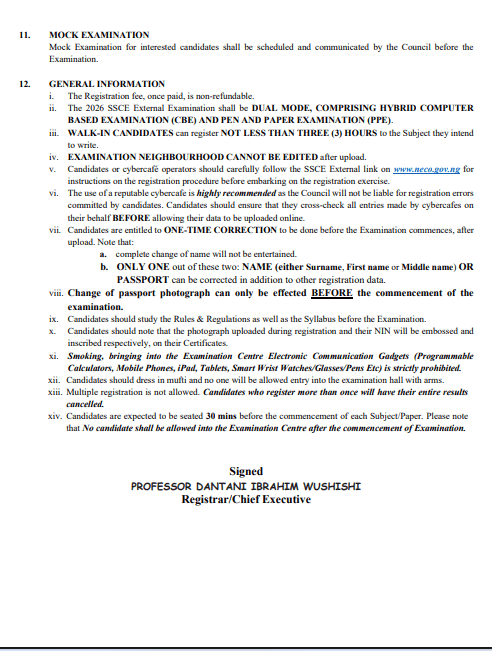
- Use Reputable Cybercafes: The use of a reputable cybercafe is highly recommended because the Council will not be liable for registration errors committed by candidates. Candidates must cross-check all entries made on their behalf before allowing their data to be uploaded online.
- One-Time Data Correction: Candidates are entitled to a one-time correction before the examination commences after upload. However, a complete change of name will not be entertained. Candidates can correct only one out of these two options: either NAME (Surname, First name, or Middle name) OR PASSPORT, in addition to other registration data. Any change of passport photograph can only be effected before the commencement of the examination.
- Ban on Multiple Registrations: Multiple registration is strictly prohibited. Candidates who register more than once will have their entire results cancelled.
- Biometric Verification & Malpractice: There will be biometric verification during the conduct of the examination. Candidates found with mismatched passport photographs or fingerprints at the point of verification are deemed impersonators and will be sanctioned according to extant laws.
- Hall Rules and Dress Code: Candidates must dress in mufti, and no one will be allowed entry into the examination hall with arms. Smoking and bringing electronic communication gadgets—such as programmable calculators, mobile phones, iPads, tablets, smart wristwatches, glasses, or pens—into the examination centre are strictly prohibited.
- Punctuality: Candidates are expected to be seated 30 minutes before the commencement of each subject or paper. No candidate will be allowed into the examination centre after the examination has commenced. Candidates should also study the syllabus and the rules and regulations before the examination.
Answering Frequently Asked Questions About NECO GCE Registration
When preparing for external examinations, specific operational policies often raise questions among candidates and parents. Here are clear answers to the most common inquiries surrounding the NECO GCE registration process.
Can You Request a Refund After You Complete NECO GCE Registration?
No, you cannot request a refund under any circumstances. The National Examinations Council maintains a strict policy stating that all registration fees, late penalties, and walk-in charges are entirely non-refundable once paid into the government Treasury Single Account.
If you make an error during payment, select the wrong exam tier, or suddenly decide not to sit for the papers, the Council will not return your money. You must confirm your readiness, verify your subject choices, and ensure you have the correct payment amount before authorizing any online transaction.
How Does the Dual-Mode Exam Affect Your NECO GCE Registration?
The Council conducts the 2026 Senior School Certificate Examination External as a Dual-Mode Examination, combining a Hybrid Computer-Based Examination (CBE) and a traditional Pen-and-Paper Examination (PPE) across sixteen selected subjects. This technological evolution directly impacts how you prepare for and write your papers.
- Objective Papers Use Computers: You will answer objective multiple-choice questions using computer terminals at your designated examination center. You must possess basic computer navigation and mouse-clicking skills to complete these sections efficiently.
- Essay and Practical Papers Use Pen and Paper: You will continue to write theory answers, essay responses, and practical calculations using standard answer booklets and pens.
- Strict Biometric Verification: Invigilators use digital scanners to verify your fingerprints and facial photograph against your registration photocard at the entrance of the computer hall. If your thumbprint or facial features fail to match the data captured during your offline application, the Council treats you as an impersonator, denies you access to the terminal, and hands you over to law enforcement agencies.
Successfully completing your registration boils down to preparation, attention to detail, and early action. Take immediate steps to secure your National Identification Number, confirm your required subject combinations, and visit an accredited cybercafe well before the November 17 regular deadline closes. When you handle your application with diligence and accuracy, you set the foundation for exceptional performance in your upcoming examinations.
Related:
FG Suspends Proposed Review of WAEC and NECO Registration Fees
NECO Rejects ‘Miracle Centre’ Label on Kogi School, Defends Examination Integrity
Everything You Need to Know About Prof. Segun Aina, the New Registrar of JAMB
Related posts:

Why Nigeria Postponed The WAEC CBT Exams 2026 Full Digital Rollout

WASSCE Verification Fee: JAMB and WAEC Fix N4,000 One-Off Payment for Admission Seekers

PROMOTING ROAD SAFETY AMONG STUDENTS THROUGH TOTAL ENERGY AND NNPC 2023

FG Suspends Proposed Review of WAEC and NECO Registration Fees

Beyond the Classroom: Why School Violence is threatening Nigeria’s Future

Aha, its fastidious discussion regarding this post here at this web site,
I have read all that, so at this time me also commenting here.